


This is a completely free and customizable ordering app for research labs, from one overwhelmed PI to another.
Most universities have an internal system for placing orders. Technically, it can track orders, but it is built as a one-size-fits-all tool for all of procurement, not for the lab. It can be finicky, it is hard to connect to anything else, not everyone has access, and it can include details that not everyone should see. Some labs give every student access, which gets messy. Others leave the ordering to one person, often a student, and too much of the burden falls on their shoulders. Commercial lab ordering software is another option, but it charges per person and works the same way for every school.
This app is meant to help with all of that. It gives your group one place to request, approve and track everything you buy, from request to delivery, including the extra steps your university requires. Your catalog, budgets and chemical safety records can all live in the same place, and you can add more detail as you wish, since the code is yours.
There is no one-size-fits-all way to run a lab's ordering, which is why I made this so that you have all of the code, and it will always be free and yours to build on. Once you have your copy, it is yours forever to change and improve. No take-backs. You can easily change it to fit your own needs, even if you have never programmed.
And if you love spreadsheets, this is not taking them away. The app runs as a Google web app on top of a single Google Sheet that you own, so your spreadsheet is still right there whenever you miss it.
It is easy to set up and costs nothing to run.
Free for academic and non-profit groups. It runs entirely inside your own Google account and sends nothing back to me.
Made for.
- Research labs of all sizes From a brand-new lab of two to a big group with a lab manager, plus core facilities. It handles grants, approvals, safety records and a catalog that learns from what you buy. Trainees can order on their own, with a mentor double-checking anything over $100.
- Teaching labs and lab courses Split the class into teams or run it student by student, and give each one its own budget, with a TA or instructor approving. We use it in our Biotech Design course.
- Student teams Undergraduate and master's design teams, clubs, and competition teams like our Duke iGEM team.
- Primarily undergraduate institutions and non-profits Ordering software usually charges per person, which adds up fast for a small department and is especially infeasible for a large class. This one is free no matter how many people use it.
Why I made this.
To all the new PIs out there, starting a lab is hard, and running one day to day is harder. We all want to be responsible with our funding... we try not to waste reagents, not to order the same thing twice, and want to know what we have and where it is. It is also a lot for new PIs to manage all of this in between writing grants and sleeping.
TBH, all institutional ordering systems are terrible. There is no one-size-fits-all solution, not everyone can have access, and often a lot of the work ends up landing on one person. Invisible work can eat up students' time that should go to research, and sometimes orders quietly get lost. If everyone places direct orders on their own, there is little accountability, and then five people buy the same antibody ten times and blow through your entire R01. Unfortunately, different kinds of labs need different systems, and one institutional system rarely fits any of them well.
Every group solves this differently. Some use a shared spreadsheet, some use Airtable, and some pay for a service whose features and prices keep changing (rarely downward). I wanted something that works well, that anyone can change, and that a small lab or a single undergraduate course could afford, which in this case means free.
When I started my lab, I had seen and set up a lot of different systems at my various institutions, none of which were perfect. A few wrenches got thrown into my plan and my spreadsheet was getting unwieldy, but I also wanted better communication so that we could easily track things down when needed, and since my lab already used Slack, this seemed like a good place to start. Nothing really seemed to meet our needs, so I decided to just solve the problem myself.
In parallel, I also teach senior design, Biotech Design (BME 406) at Duke, where an important part of the course is teaching students to plan experiments responsibly, and each team has a budget for its own supplies. A lot of that ordering work falls on our amazing teaching lab staff, so I also wanted something that would work with student groups. Paying a per-seat price is not really an option for a class of 40+ students or for managing a teaching budget, so I made something that can do that too.
I also believe that learning to appreciate the cost of doing science matters, especially for students who want to start their own labs or companies, and at a time when funding is so hard to come by. When students see what things cost, plan experiments around a budget, and can see where every order stands, they become more thoughtful about how they spend, and that habit follows them into every lab they join. That experience is especially important for undergraduates, so this is meant just as much for teaching labs, iGEM teams, and other undergraduate projects as it is for research labs.
I decided after a few months of beta testing in my lab that it was time to share this. To be very honest, while I will keep improving our lab's version, I am sharing this one as a starting point rather than something I plan to keep updating. With tools like Claude, it is now easy to change it yourself, and I hope you make it your own, like we have. (I also included some tips for anyone who finds this intimidating and wants to learn to make their own changes easily. Disclaimer: I am NOT a programmer.)
Not just for Duke.
The app works at any institution (yes, even UNC). It does not connect to your university's ordering system, so you will still place orders there the way you always have. What it does is make it much easier to keep track of the parts of the process that are unique to your school, like purchase order numbers, carts, goods receipts, standing orders, purchasing forms and budget codes. You set these up in Settings, and anything your school does not use can be switched off.
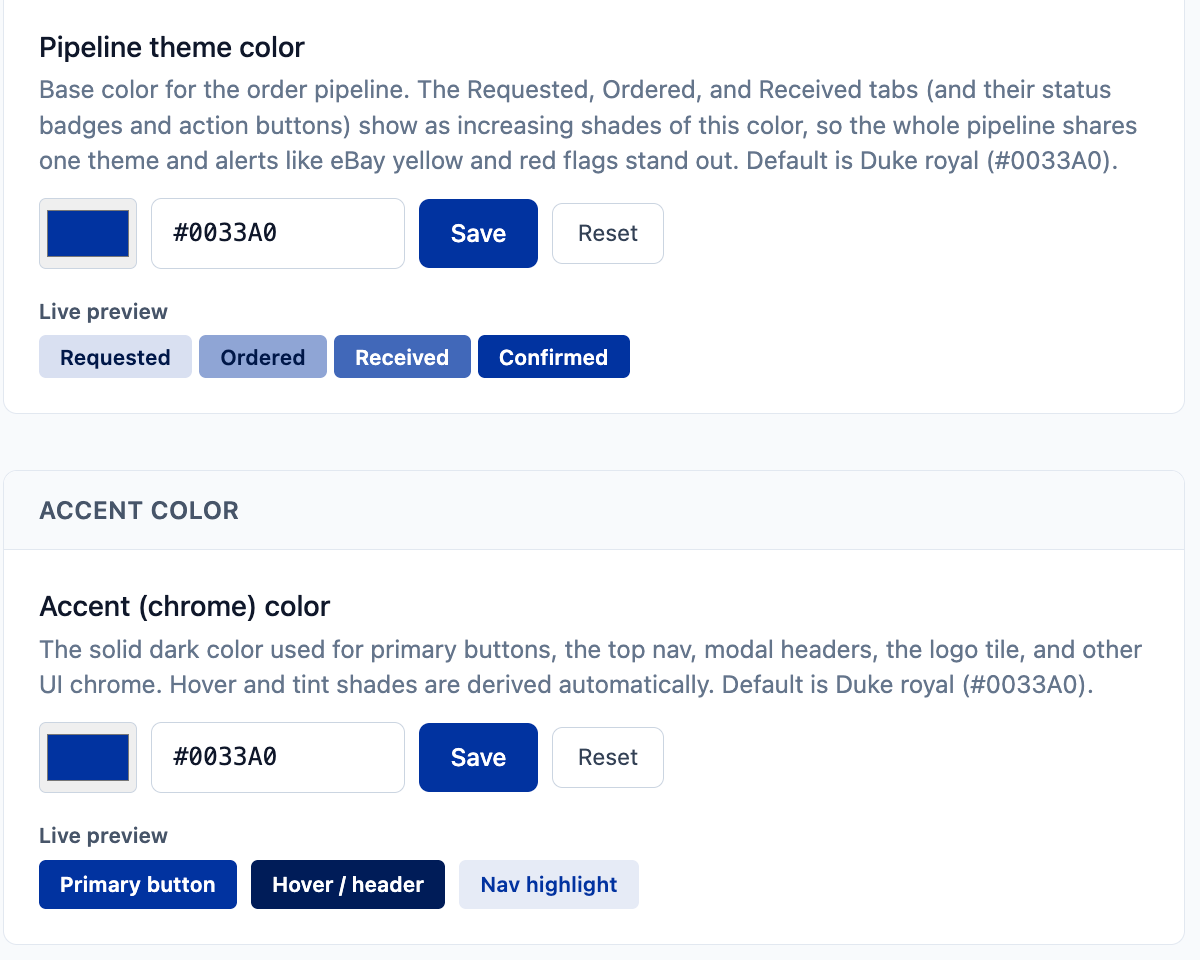
I also completely understand that you may not want a Duke blue app, so the colors and logo are yours to change too.

If you are at Duke, request access with your Duke email and I will add all of the Duke-specific things we have, like our purchasing forms, Buy@Duke settings, GL codes and catalog.
How it works.
Secure access through Google
People sign in with their Google account, and nobody gets in until you approve them and choose their role. There are roles because not everyone needs the keys to everything, and nobody wants to personally approve every box of pipette tips.
- Requesters order what they need.
- Admins place the orders.
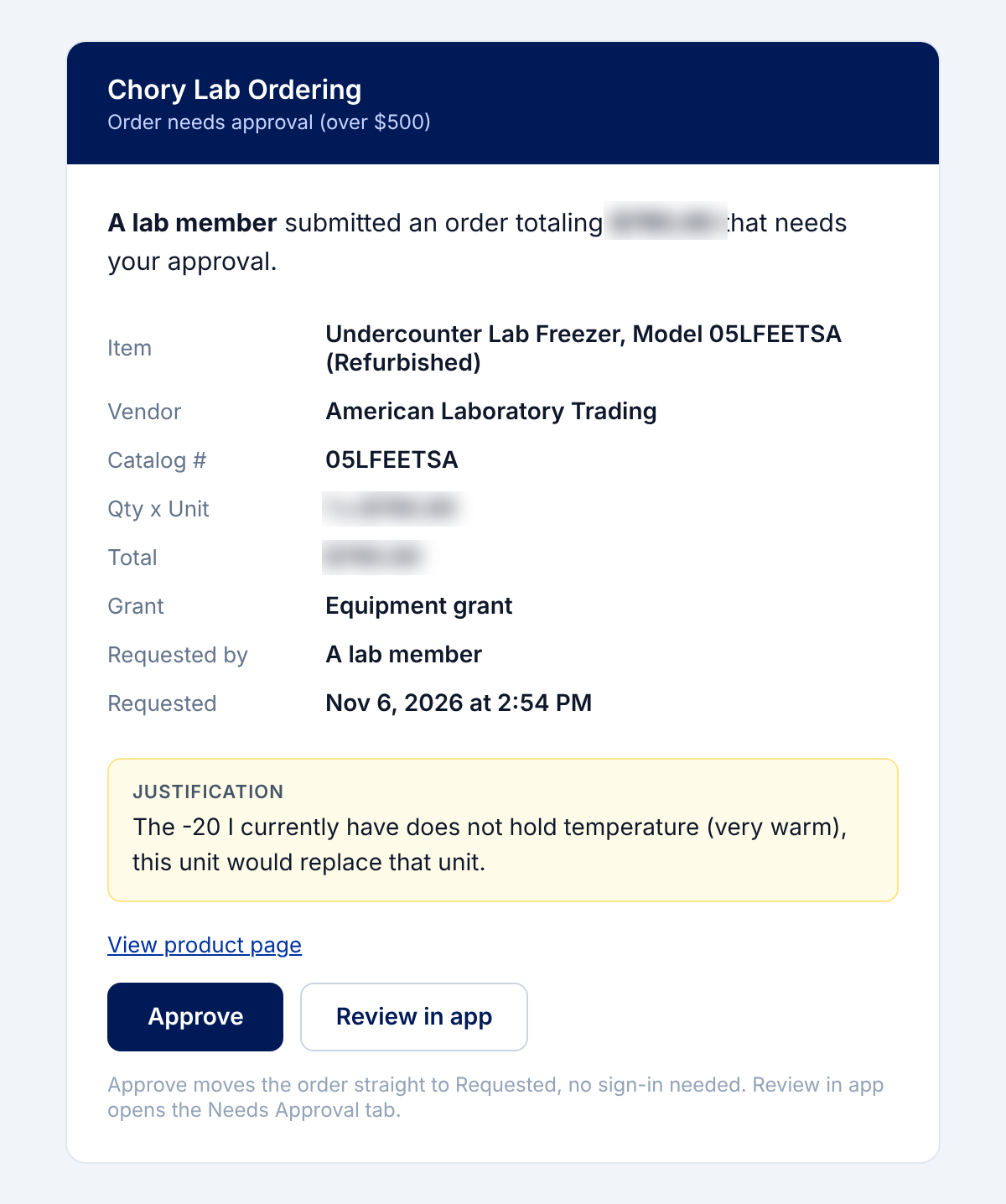
- Approvers sign off on anything over your dollar limit.
- TAs approve for their class.
- Viewers can look without touching.
- Trainees, like undergraduates, can order directly, and their graduate or postdoc mentor gets an email to double-check anything over $100. That gives students independence while still keeping an experienced person in the loop.
You can adjust the approval limits in Settings.
Emails and Slack
- Approval emails with a one-click Approve button.
- Daily digests of what still needs to be done.
- Direct emails to people in your group.
- Slack posts for new requests, with progress shown as emoji reactions on the original message.
Setting up Slack and the Gmail filters that route vendor emails to the app takes about 15 to 20 minutes, and the setup instructions walk through it step by step.
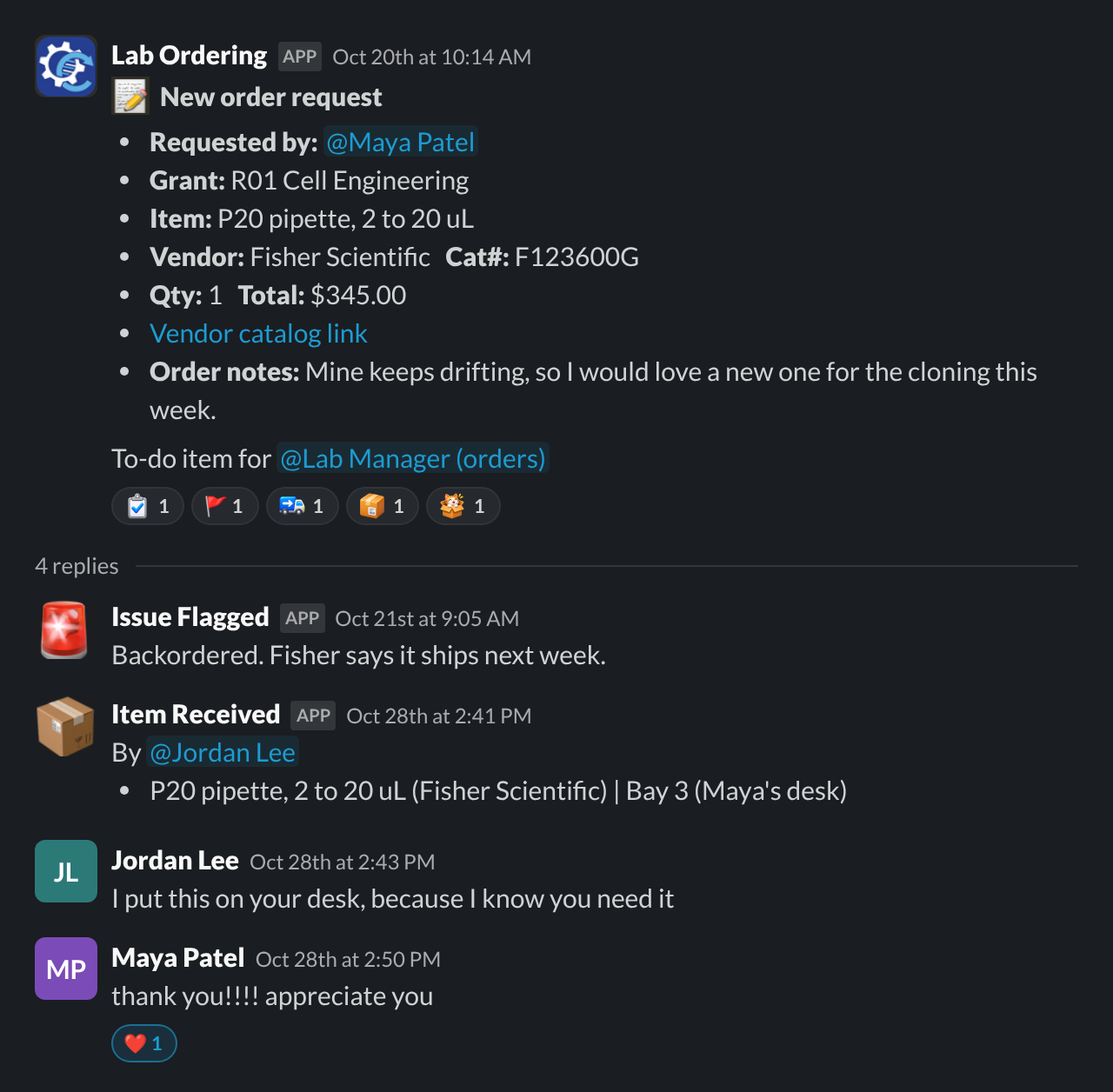
Every order in one place
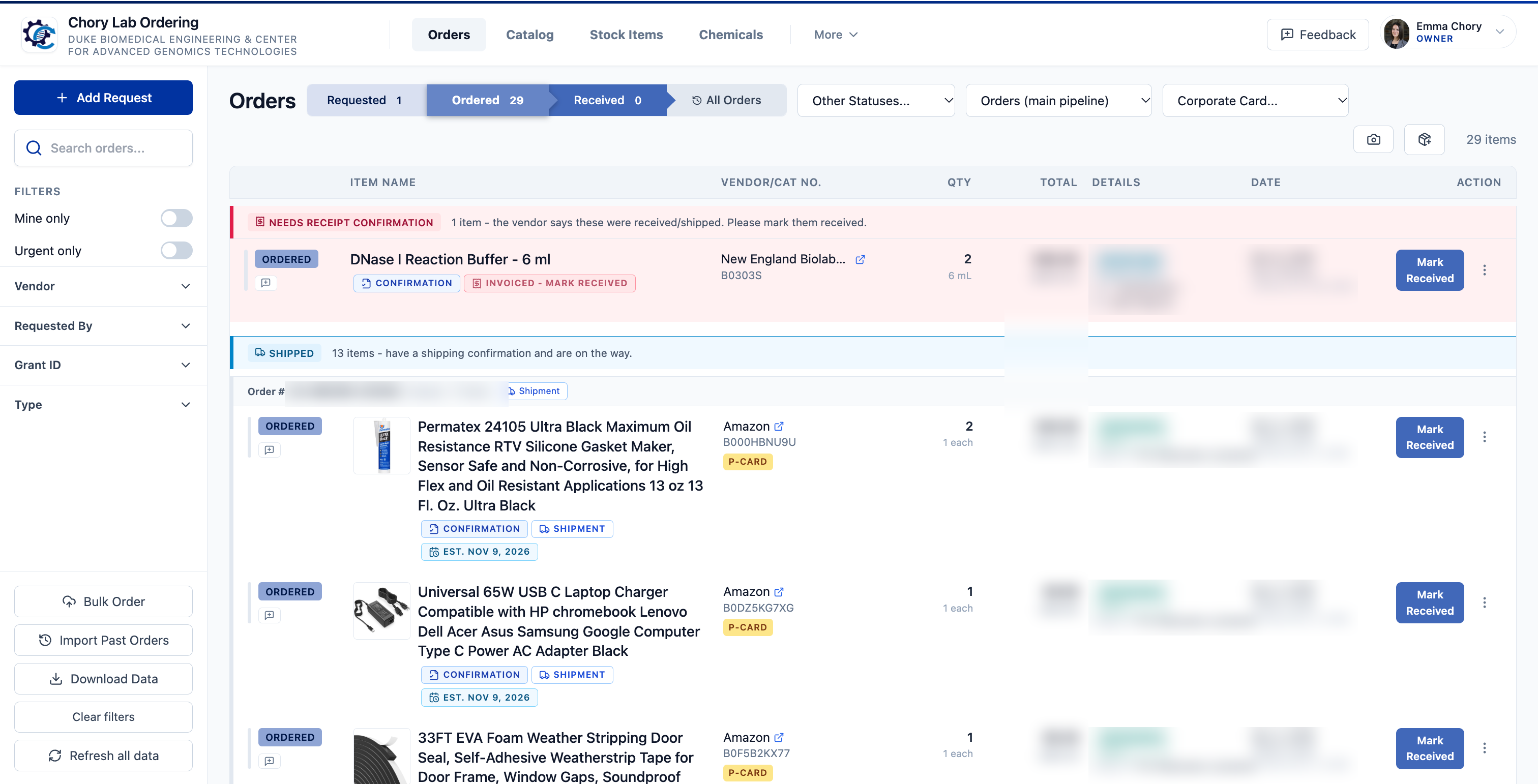
Every request goes through the same steps, and everyone can see where every order stands, so nobody has to ask "did that ever get ordered?" in the group chat.
- If it is over your limit, an approver signs off.
- Then an admin places the order.
- Whoever opens the box marks it received.
Because everything lives in one Google Sheet, you can import your past order history, fix anything by hand, and take your data with you at any time.
A catalog that learns from what you buy
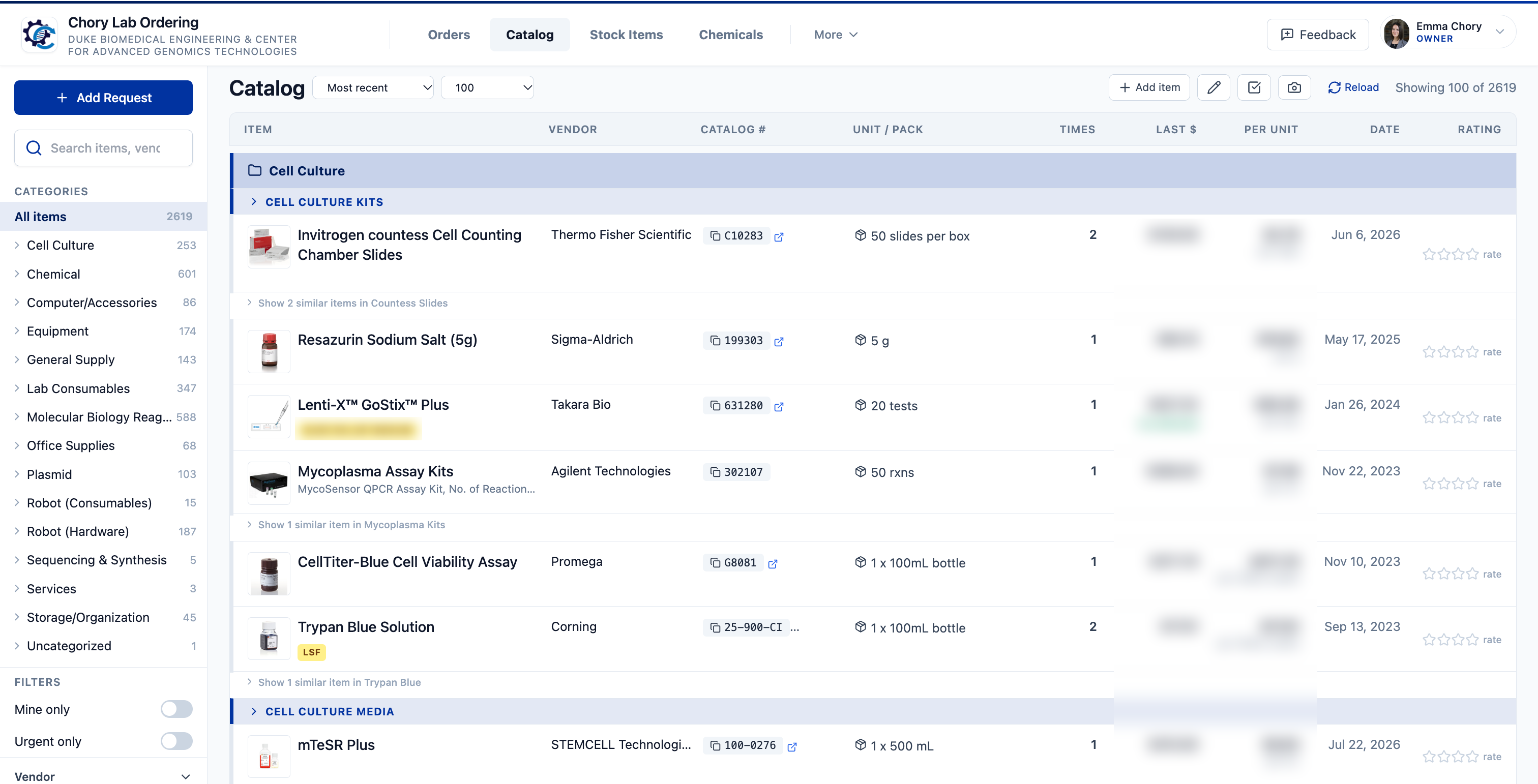
Every item your lab orders goes into the catalog, so nobody has to hunt for the link someone sent two years ago.
- Full details, including each item's picture, product link, catalog number, pack size and price per unit.
- Reorder in a few clicks by starting to type the item's name.
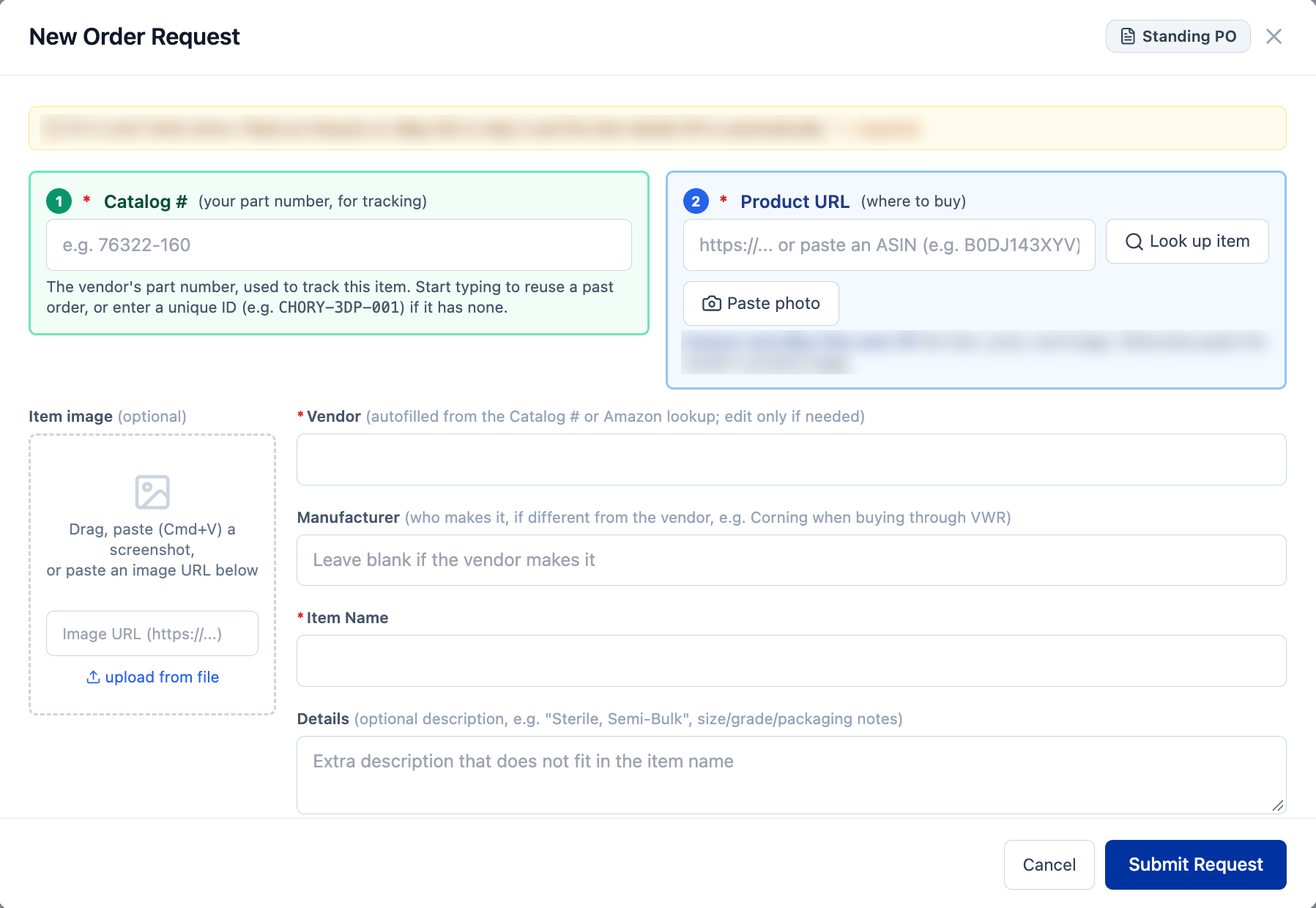
- For something new, paste the product link and the app fills in what it can.
Safety first.
Chemical safety is part of running a lab, not an afterthought, so it is built into ordering.
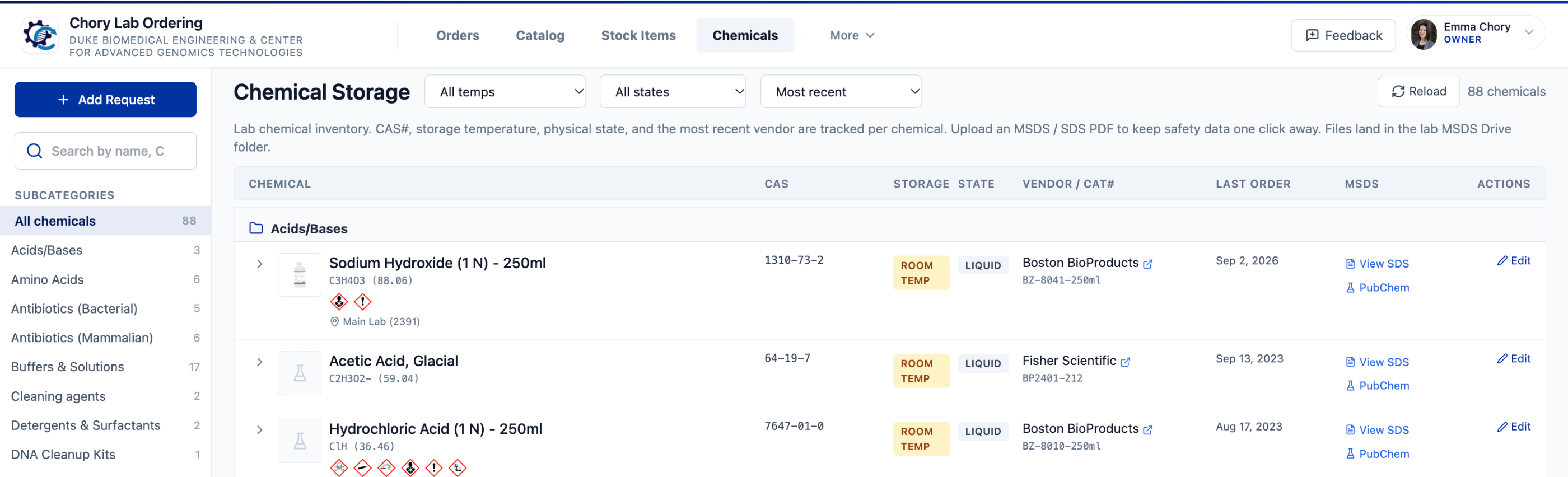
- Automatic lookup. When someone orders a chemical, the app looks it up in PubChem, so the CAS number, hazard statements and pictograms fill in automatically.
- Safety data sheets. You can attach the SDS to each chemical, so it is one click away for everyone in the lab.
- Storage. Each chemical's record also shows where it is stored.
Your safety officer will be delighted, possibly for the first time.
Lab analytics.
See where the work goes, not just the money
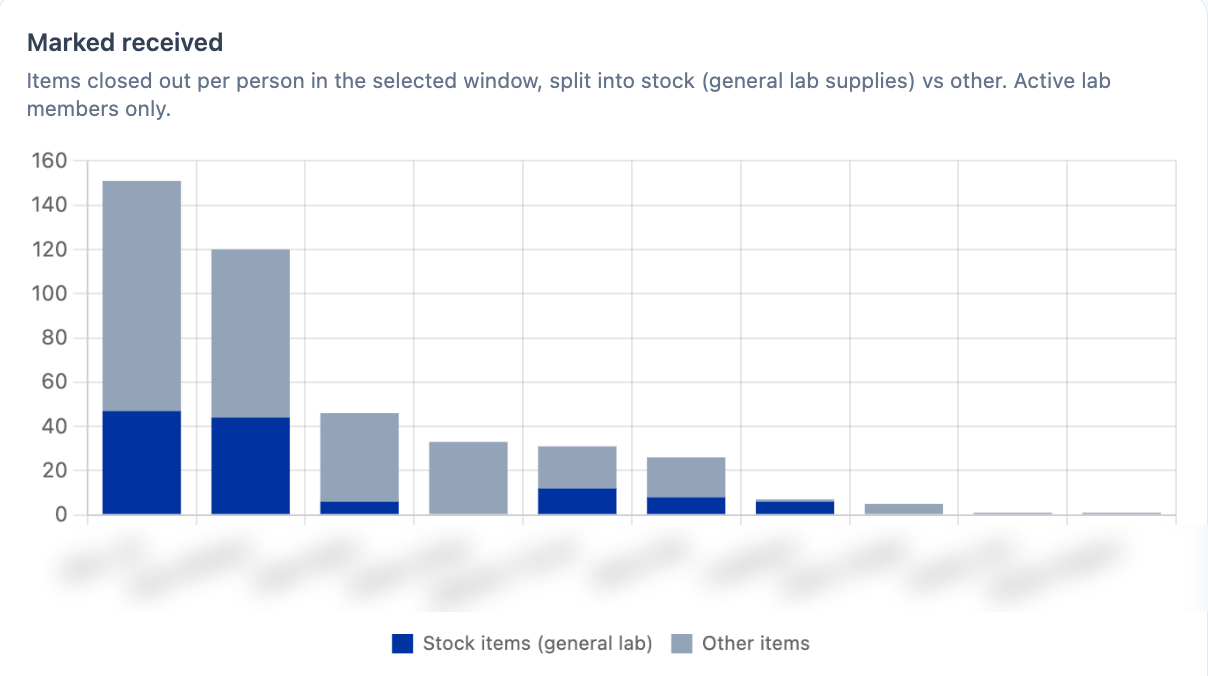
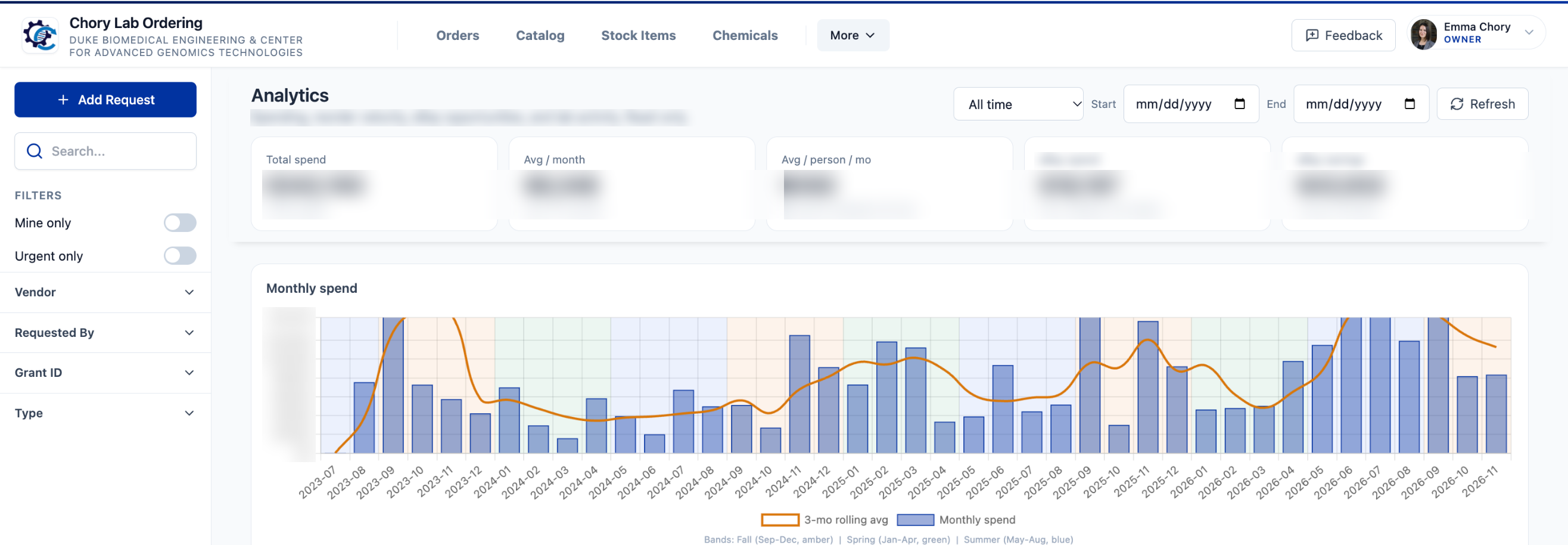
The owner's Analytics tab shows spending by grant, vendor, category and person. It also shows the work nobody sees: who receives and puts packages away, and who keeps restocking the common items everyone uses.
If one person is carrying a disproportionate share, that is worth knowing. It might mean redistributing tasks, setting up a rotation, or making the case for a lab manager. Feel free to show this chart to your chair.
Make it yours.
Admins and owners can change almost everything from one place. Click your name in the top right corner of the app and choose Settings. Owners can see every setting, and admins can see the ordering rules. Nobody needs to touch any code.
Your colors, your process
- Colors. Pick your own color palette with a live preview. Carolina blue is only a few clicks away, and I promise not to take it personally.
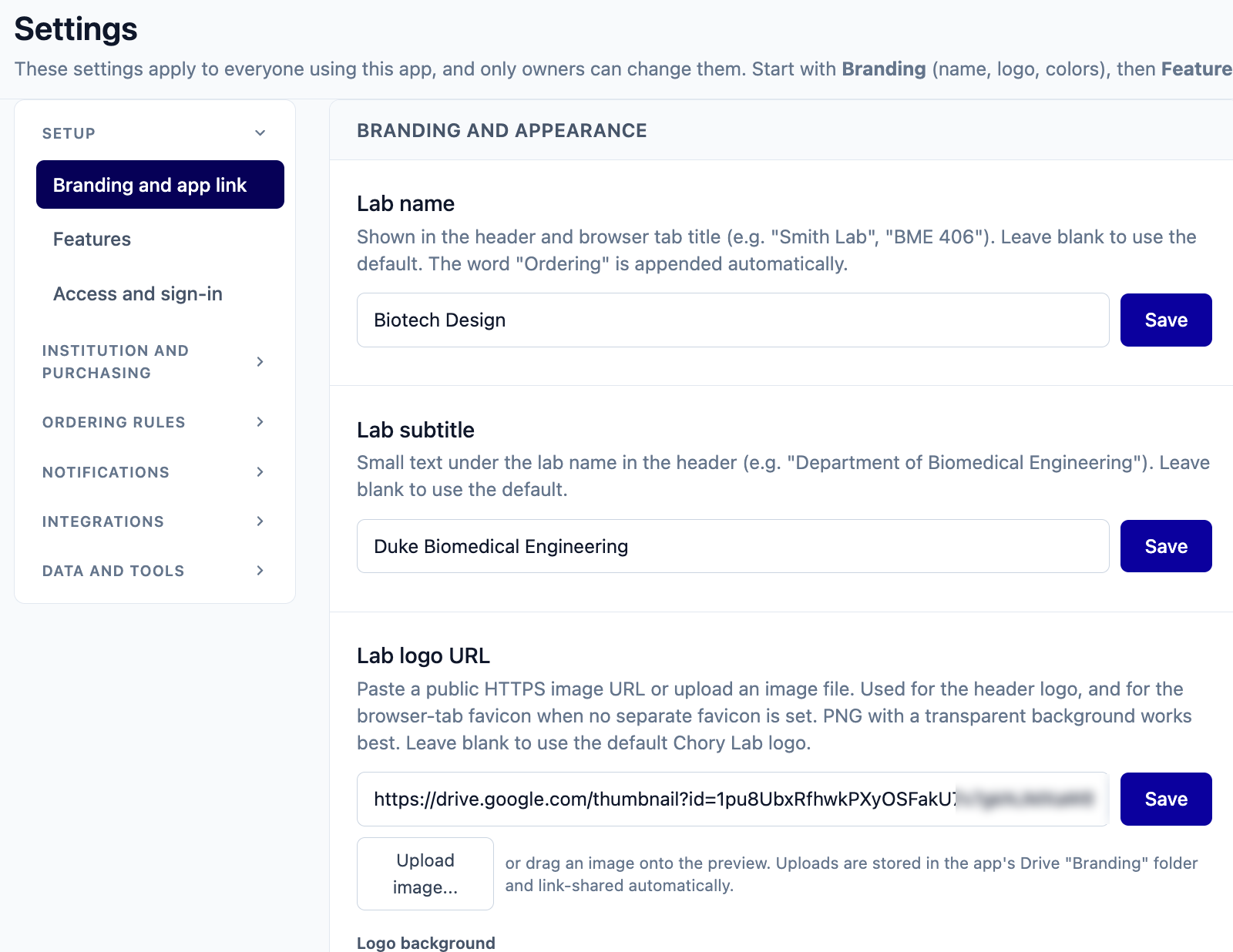
- Name and logo. Upload your lab or school logo, and set your lab name and subtitle.
- Purchasing. I built the app for universities with complicated procurement departments, so it supports purchasing forms, internal codes and standing orders. Every one of those features can be switched off if you want something simple.
- Classes. Turn on groups and budgets, then split students into teams or give each student a budget of their own.
Change it yourself, safely
You do not need to have programmed a day in your life. Tools like ChatGPT and Claude can now make careful changes from a plain-language request, and since the code is yours, you can keep changing it for as long as you like. The setup instructions include my recommendations, which come down to three habits.
- Practice on a separate copy.
- Change one thing at a time.
- Keep a copy of what worked.
Some little features.
These are the small features that add up when you are the one running the lab.
- Storage locations and boxes. Record where each item was put away, down to the box and slot.
- Default grants. Give each person a default grant ID, so their requests are charged to the right grant automatically.
- Stock items. Group the different brands of the same thing, like tips, gloves or conicals, and reorder in one click.
- Item ratings. Lab members can rate items and leave notes, so you know which antibody actually worked.
- Reused justifications. Reordering something fills in the justification from the last time it was ordered.
- Duplicate check. A regular sweep flags when two people have requested the same thing.
- Price comparisons. Record what other vendors charge for the same catalog number.
- Vendor logins and discount codes. Kept in one place, behind a password.
- Shipping locations. Save your building and room addresses, with a default.
- Standing purchase orders. Track them with their dates and limits.
- Custom DNA orders. Oligos, gene fragments and sequencing, with your own pricing.
- Bulk orders and past orders. Order many items from one vendor at once, and import your old order history.
- Invitations. Invite people straight into a role instead of waiting for them to request access.
- Weekly reminders. Each person gets a nudge about their own orders that need attention.
- Flags and comments. Report a problem with an order, and the conversation stays on that order.
- Quiet Slack. Received items are batched into one post, so one person putting away a pile of boxes does not flood the channel.
- A Chrome extension. Add items to the catalog straight from a vendor's product page.
- PDF catalog import. Pull items from a vendor's PDF price list into your catalog.
- Equipment logins. Keep logins for instruments and lab computers with everything else.
- Download your data. Export everything at any time.
...and probably a dozen things I have forgotten. Since the code is yours, you can add whatever is still missing.
Get it.
For a school team, the teacher or adult advisor should send the request.
Request access
Fill in the short form with your institutional email, the Google account you will copy the app with, your PI or instructor, and a link to your group's page.
Confirm your academic email
I will send a link to your academic address. This is how I know the request is really from you.
Get approved
I review each request myself, usually within a few days, and email you the step-by-step setup instructions. You will log in with your Google account, and the first step is making your copy.
Copy and set up
Make a copy, run one setup function, and publish it for your group. It takes about 30 minutes, and the instructions explain every click.
Questions.
Will my copy get updates?
No, and that is on purpose. Your copy is independent, so nothing changes without you. You have all of the code, so it is yours to keep and change.
Can people outside my group see our orders?
No. Only people you approve can use the app, and only you and the editors you choose can open the spreadsheet. Files people attach are stored in Drive folders the app shares by link so it can display them; the links are long, random and shown only inside the app.
Do I need a Google Workspace account?
No. A free Gmail account works. A shared lab Gmail account is best, so the app does not depend on one person.
Is it Duke-specific?
No. Institution names, purchasing systems, codes and forms all come from Settings. Copies made for groups outside Duke contain no Duke data.
Support
This is a tool from one research lab, shared as is, so I cannot promise support or new features. If you get stuck, the troubleshooting section of the setup instructions is the best place to start.
Optional feedback survey
The request page also has a short, optional, anonymous survey about your group and how you order now, so I can understand who uses the app and make it better. It is completely separate from your request, and you can skip straight past it. It never asks for names, email addresses or your institution, and skipping it has no effect on access. Nothing from inside your copy of the app is ever collected.
Terms, in short
Copyright © 2026 The Chory Lab, Duke University. It is free for academic and non-profit groups. You are free to use it in your group and change it however you like. That is the point, and I hope you improve it. Please do not share copies or the template link outside your group; anyone else can request their own access. Full terms of use.
What does it cost to run?
The app itself is free and has no subscription. Two optional extras cost a little: the ChatGPT API, which reads messy order numbers and product pages, costs our lab a few cents a month, and PDF.co, which saves vendor emails as PDFs for your records, is about $9 a month. Slack works on a free workspace.
Permissions and privacy.
When you set it up, Google will show a permission screen and call the app "unverified". That only means Google has not reviewed this particular copy. It is your own copy, running in your own account, and nobody else, including me, can run it or see its data.
| Permission | Why |
|---|---|
| Your spreadsheets | Reads and writes the app's own spreadsheet, and any other sheet you choose to link. |
| Your Google Drive files | Creates the app's folder and saves files people attach. It only works inside its own folder and files you point it at. |
| Your email address | So the app knows who is signed in. |
| Background tasks | Sends notifications and digests on a schedule. |
| External services | Only the ones you turn on: Slack, ChatGPT or Claude, PDF.co, PubChem, and vendor pages when you add an item from a link. |
| Send email as you | Order notifications and digests. |
| Read your email | Only for the optional email intake, if you turn it on. It looks for vendor emails sent to the addresses you set up, and never sends, changes or deletes email. |
The people in your group are asked for much less: when they sign in, the app sees only their name and email address.
What it tracks
Your copy keeps track of orders, the people in your group, the files they upload, and a log of every change with who made it and when. All of it lives in your spreadsheet and your Drive, and you can read, export or delete any of it.
What I see
Nothing from your copy. There is no usage tracking and no connection back to me. The only information I hold is what you put on the request form, kept privately and used to approve access, count how many groups use the app, and email you about updates if you ask. To have it removed, reply to any email I have sent you.
Last updated 7 November 2026. Copyright © 2026 The Chory Lab, Duke University. Free to use and change for your own group (terms).